ALPS-Bench
1,000 real-asset layouts annotated from CAD drawings. They cover 14 semantic classes, irregular premises, and multiple access points, and each comes with a design manual of hard and soft constraints.
Explore the benchmark CANDO
CANDO
NeurIPS 2026 · Main Track
Real sites have irregular boundaries, vehicles that must get through, and design manuals full of rules. We introduce ALPS-Bench, a benchmark of 1,000 real facility layouts scored by design-manual compliance. We also present CANDO, a training-free team of agents that plans, edits, and checks layouts with deterministic tools until they comply.
1Shell Information Technology International · 2Shell China Limited · 3Delft University of Technology
TL;DR
Most layout benchmarks place boxes on rectangular canvases and score results with FID or IoU. These metrics reward similarity to the training set, so a valid but unusual design gets marked down. Real asset design is harder. The site boundary is irregular, groups of elements need consistent orientations, placements depend on where the access points are, and vehicles must be able to drive through the finished layout.
We address this with a benchmark that scores each layout against a structured design manual instead of against other layouts, and a method that splits the reasoning across specialised agents. Deterministic tools handle the spatial arithmetic that LLMs get wrong.
1,000 real-asset layouts annotated from CAD drawings. They cover 14 semantic classes, irregular premises, and multiple access points, and each comes with a design manual of hard and soft constraints.
Explore the benchmarkA cooperative, training-free team of agents: a Verifier, a Historian, a Planner, and a Generator. They repair an in-context seed layout through CoDe-style parallel branching, with every step checked by tools.
See how it worksA simplified CANDO sets state-of-the-art mIoU and alignment on PubLayNet and RICO. On PKU-PosterLayout it has the lowest overlap and the best strict-underlay scores.
View resultsThe benchmark
Annotators traced polygons directly from the original CAD drawings of operational sites, so each layout reflects the site as built. The task: given the premise, its access points, and a list of elements with fixed shapes, find a position and an orientation for every element.
Hover a class to highlight it. Elements are grouped into four functional families.
Share of all 1,000 layouts that contain each class.
The development set 𝒟dev ships with full annotations and is split into 800 training and 100 validation layouts, for training, in-context retrieval, and tuning. Only the input requirements of the 100 test layouts are public. Their ground truth stays hidden for evaluation on a hosted server.
Every placed element lies inside the premise: .
No two surface elements intersect: . Underground facilities may lie beneath surface elements.
For every vehicle scenario, a collision-free path runs from an Entrance, through the required waypoints, to an Exit. Service areas are drive-through.
Elements of the same class form clusters. Odd-sized service clusters form a line; even-sized ones form a compact block (2×2, 2×3, …). Parking bays form strict lines.
Within a group, every element is parallel or perpendicular to the others, within 5°.
Stacking against the site boundary or the Shop, 3 m egress zones in front of parking bays, isolation of HGV service areas, and service-area hubs placed next to underground facilities.
Motion planning
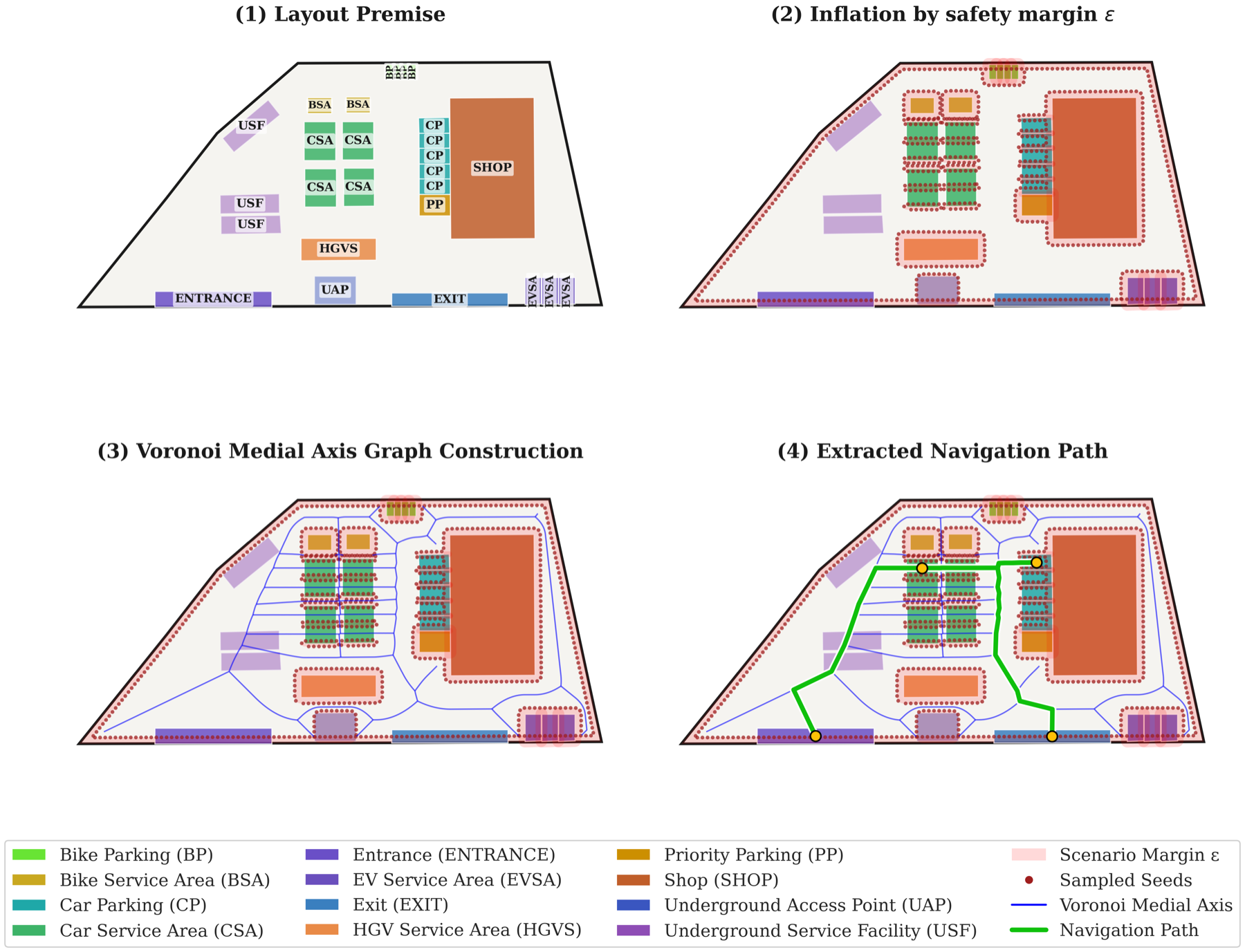
Geometric validity (area-scaled penalties for overlaps and out-of-bounds parts) plus the fraction of feasible routing scenarios. A missing or wrongly sized element sets HCM to 0.
Soft constraints from the design manual. The weights are proportional to the number of rules in each category.
Path length, manoeuvrability (number of sharp turns), and path clearance, each compared with the hidden ground truth. A score of 0.5 means parity with the ground truth.
An invalid layout keeps at most half of its soft-constraint score.
Dataset viewer
All 100 layouts of the validation split (part of 𝒟dev, alongside 800 training layouts), drawn in the browser in the same style as the released dataset images. Filter by class, sort by complexity, and open a layout to inspect individual elements.
The method
Language models are weak at coordinate arithmetic. CANDO lets the models make the strategic decisions (what to move, and why) and leaves the geometry to deterministic tools. The method works in two phases: an in-context seed, then a cooperative refinement loop.
Search
CANDO adapts CoDe’s blockwise sampling from diffusion models. At the start of each block, the current best layout is copied into N branches. Each branch runs B history-aware planning–generation–verification steps with its own memory. At the end of the block, the branch with the highest verified score is kept and copied again. This lets CANDO explore different repairs in parallel without committing to one too early.
Illustration with simulated scores. With B = T, CoDe reduces to plain best-of-N. The paper uses N=4, B=10, K=6, W=6, T=20.
Generator
Each branch gets strategies at random. Some follow the plan and some ignore it. Without this mix, the regression rate climbs from 7.0% to 18.4%.
Require ℐ, 𝒟dev, N, B, K, W, T
ℋ(0) ← ∅ ;  t ← 0
(𝐪̄(0), ℱ(0)) ← Verifier({ICLInit(ℐ, 𝒟dev)})
while t ≤ T − B do
    {ℋ(t)n, ℱ(t)n, 𝐪(t)n}Nn=1 ← Replicate(ℋ(t), ℱ(t), 𝐪̄(t))
    for b = 0, …, B−1 do                        ▷ ∀ n ∈ [N], in parallel
        ℋ(t+b+1)n ← Historian(ℋ(t+b)n, ℱ(t+b)n, W)
        Π(t+b+1)n ← Planner(𝐪(t+b)n, ℱ(t+b)n, ℋ(t+b+1)n)
        𝒬(t+b+1)n ← Generator(𝐪(t+b)n, Π(t+b+1)n, K)
        (𝐪̄(t+b+1)n, ℱ(t+b+1)n) ← Verifier(𝒬(t+b+1)n)
    t ← t + B
    (𝐪̄(t), ℱ(t), ℋ(t)) ← BoN({𝐪̄(t)n, ℱ(t)n, ℋ(t)n}Nn=1)
end while, return 𝐪̄(T)
Results
Both CANDO variants significantly outperform every baseline on AGG, CS, and RE (paired Wilcoxon, Holm-corrected ). This includes models trained on ALPS-Bench and a GPT-5.2 agent that has CANDO’s own tools.
◆ diffusion▲ single LLM/MLLM● agentic† trained / fine-tuned on ALPS-Bench
τ is the cost of one LLM call. CANDO makes four sequential agent calls per step, and its steps run in parallel.
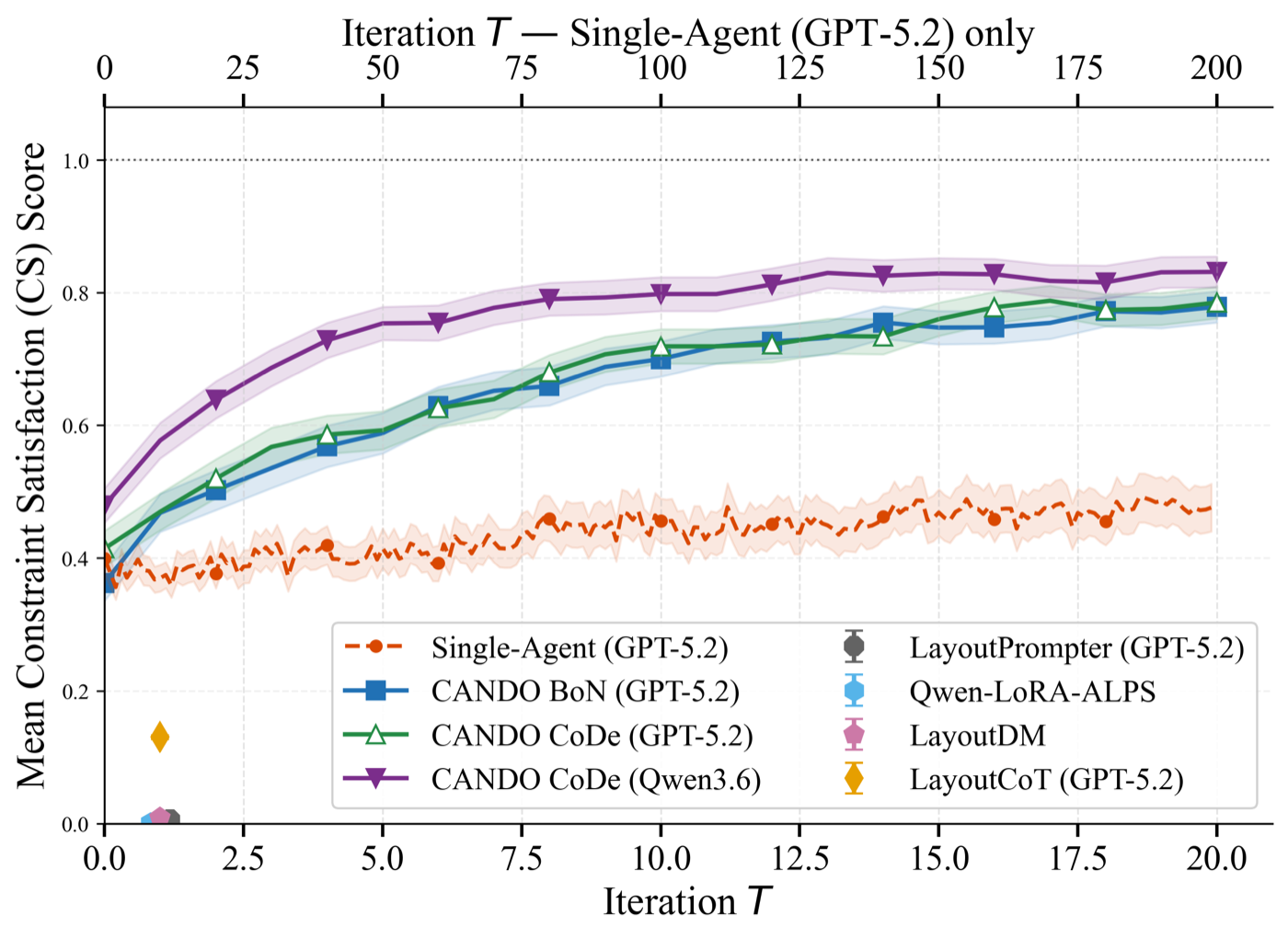
Regression rate is the share of refinement steps that lower the verification score. *Without tools, the Verifier works as an LLM-as-a-judge and overestimates compliance.
Interactive
Pick a validation layout and scramble it. Then drag and rotate elements to repair it, and press Evaluate to get the scores and feedback that CANDO’s Verifier would give you. The premise, Entrances, and Exits stay fixed.
Citation
BibTeX coming soon, once the NeurIPS 2026 proceedings are published.